
If you’re an IT manager at a small or midsize business, free customer service software gives you a practical way to manage tickets, customer requests, and support workflows without committing to a paid plan upfront.
As your customer base grows and your support needs become more complex, many of these platforms also offer paid plans with more advanced automation, reporting, integrations, and customization.
In this guide, we compare nine customer service tools: six with forever-free plans and three that offer free trials. We also highlight the key limits of each free option, whether that is the number of agents, monthly ticket volume, feature restrictions, or limited ticket history, so you know exactly what to expect before adopting a platform.
You will also see what each tool offers, where it works best, and what the upgrade path looks like as your support operations grow.
Let’s take a look at the best free customer service software available today.
TL;DR: Best free customer service software shortlist
Forever free plans
- Desk365 – Free for up to 3 agents with 50 tickets a month, email ticketing, a shared inbox, and Microsoft Teams ticketing built in.
- Zoho Desk – Free forever for up to 3 agents with email ticketing, a help center, and basic reporting.
- LiveAgent – Free forever for unlimited agents with live chat and email ticketing, but ticket messages older than 7 days are hidden.
- HubSpot Service Hub – Free forever for up to 2 users and 1,000 contacts with ticketing, live chat, and free CRM access.
- Jira Service Management – Free forever for up to 3 agents with a customer portal, request queues, and an embedded knowledge base.
- Spiceworks – Free forever for up to 5 technicians with unlimited end users, supported by ads instead of a paywall.
Free trial only
- Freshdesk – Free trial only: 14 days of full Enterprise-level access, then a paid plan starting at $19 per agent per month.
- Front – Free trial only: 14 days of Professional features with no credit card, then $25 per seat per month.
- Gorgias – Free trial only: 7 days built for Shopify stores, then plans from $10 per month for 50 tickets.
Why you can trust our reviews
We read each tool’s current pricing page directly, not a cached version or a sales rep’s pitch, and cross-checked the agent caps and feature cutoffs against independent reviews and real user reports on G2 and Reddit. Where a free plan had changed in the last year, we called it out by name instead of quietly updating the number and moving on.
That last part matters more than it sounds. A tool that was free for ten agents two years ago and is free for two agents today is not the same recommendation, even if the name on the page has not changed. Read our review methodology here.
Best free customer service software: Full reviews
These six tools keep a free plan available with no end date. Each one caps agents, users, tickets, or features, and the limits are listed below.
| Software | Free Plan Details | Best For & Ratings |
|---|---|---|
| Desk365 |
Forever free 3 agents 50 tickets per month |
Microsoft 365 and Teams-based teams G2: 4.9/5 Capterra: 4.9/5 |
| Zoho Desk |
Forever free 3 agents No ticket limit listed |
Teams already using Zoho apps G2: 4.4/5 Capterra: 4.5/5 |
| LiveAgent |
Forever free Unlimited agents No ticket limit listed; 7-day ticket history |
Live chat-heavy teams G2: 4.5/5 Capterra: 4.7/5 |
| HubSpot |
Forever free 2 users No ticket limit listed; 1,000 contacts |
CRM-focused teams G2: 4.4/5 Capterra: 4.4/5 |
| Jira Service Management |
Forever free 3 agents No ticket limit listed; 500 automation runs per month |
IT service management (ITSM) teams G2: 4.3/5 Capterra: 4.5/5 |
| Spiceworks |
Forever free 5 technicians No ticket limit listed |
Small internal IT teams G2: 4.3/5 Capterra: 4.4/5 |
| Freshdesk |
Free trial Not applicable Not applicable |
Structured, SLA-driven support G2: 4.4/5 Capterra: 4.5/5 |
| Front |
Free trial Not applicable Not applicable |
Collaborative shared inbox G2: 4.7/5 Capterra: 4.5/5 |
| Gorgias |
Free trial Not applicable Not applicable |
Ecommerce and Shopify stores G2: 4.6/5 Capterra: 4.6/5 |
1. Desk365

4.9/5

4.9/5
Why it earned a spot
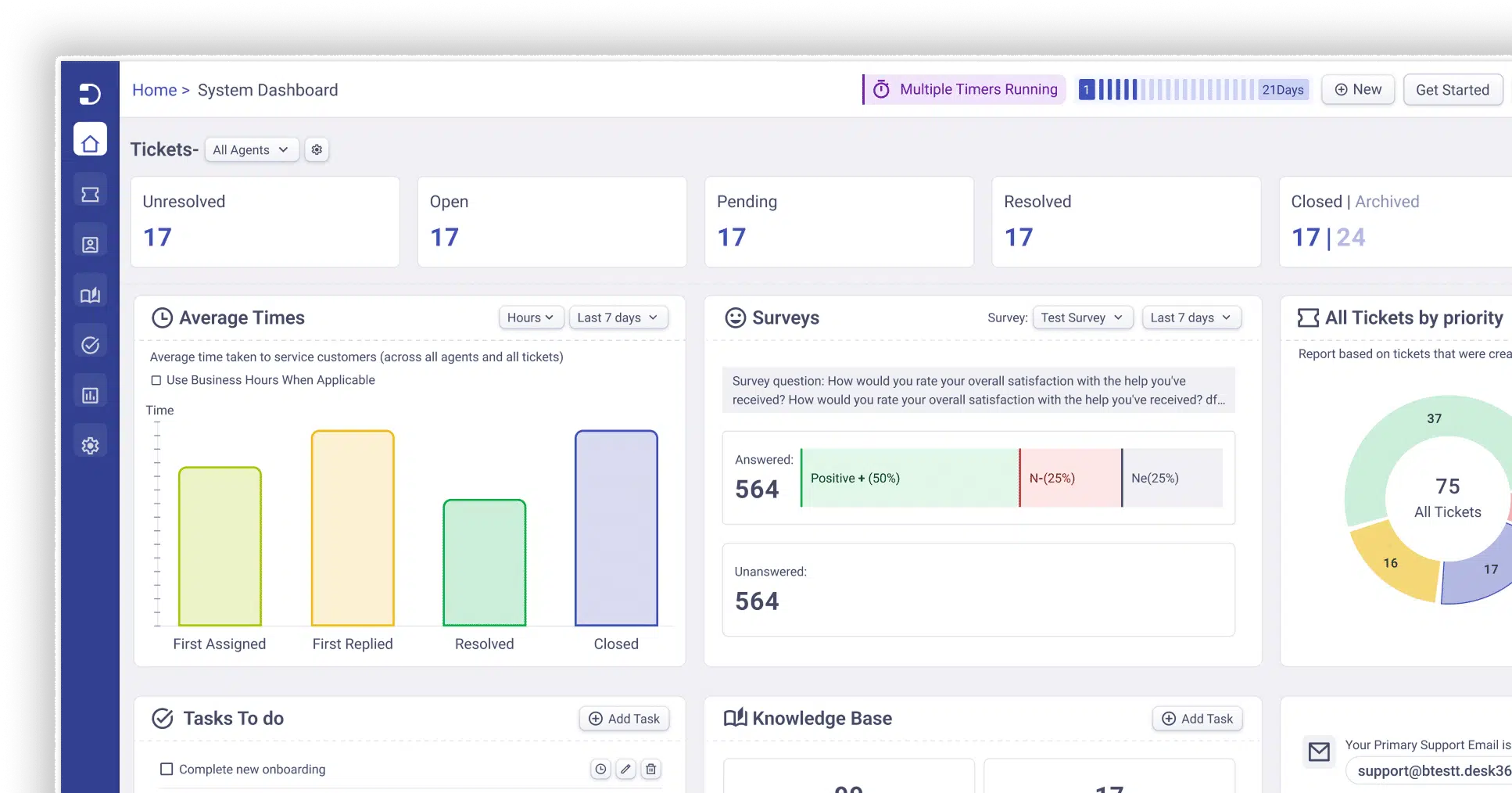
Desk365 is a helpdesk built for teams that run on Microsoft 365, and its free plan handles tickets by email, portal, and Microsoft Teams ticketing. That makes it a practical first helpdesk for IT managers and support leads at small businesses, who can start without a budget request. Teams sits at the center of the product instead of being a connector, and paid plans start at $12 per agent per month billed annually, listed on the Desk365 pricing page
Desk365 free plan features:
- Free for up to 3 agents
- Up to 50 tickets per month
- Email ticketing and unified inbox
- Microsoft Teams ticketing
- Customer support portal
- Web forms and web widget
- Basic workflow automation
- Knowledge base
- Microsoft Entra ID single sign-on
- Built on a SOC 2 Type II certified, GDPR-compliant platform
What customers are saying about Desk365
“Best-in-Class Pricing, Easy Onboarding, and Great Integration” – Peter S.
Pros
- Native Microsoft Teams integration. Reviewers say their team can raise and handle tickets directly in Teams without switching tools. [See Review]
- Easy setup and onboarding. Users report being operational within about a day with minimal training. [See Review]
- Responsive support and product team. Reviewers say issues get fixed quickly and feature requests are taken seriously. [See Review]
- Good value for the price. Users describe the pricing as best-in-class and say the system works flawlessly for what it costs. [See Review]
Cons
- Integration gaps. One reviewer would like to see a Slack integration alongside the Teams one. [See Review]
- Reporting could go deeper. Users say they want more reporting to share with executive management and more robust ticket and knowledge base metrics. [See Review]
2. Zoho Desk
4.4/5
4.5/5
Why it earned a spot
Zoho Desk gives up to three agents email ticketing and a help center at no cost, with no time limit. If your customer data already lives in Zoho CRM or other Zoho apps, it carries across. The free tier stops at basic ticketing, so treat it as a starting point before the Express plan at $7 per agent per month billed annually. Our Zoho Desk pricing breakdown covers each paid tier.
Zoho Desk free plan features:
- Up to 3 agents
- No time limit
- Email ticketing
- Help center and private knowledge base
- Basic ticket management
- Basic reporting
Pros
- Strong automation and routing. Users highlight multi-channel ticket routing, automated assignment rules and SLA tracking. [See Review]
- All channels in one interface. Reviewers say email, chat, phone and social tickets are easy to track and prioritize in one place. [See Review]
- Fits well with the Zoho ecosystem. Users say it keeps customer information connected across other Zoho apps. [See Review]
Cons
- Key features sit on higher tiers. One reviewer says the multi-location capability they needed is only available on Enterprise. [See Review]
- Limited outside the Zoho ecosystem. One reviewer says third-party integrations can be more limited or need extra configuration. [See Review]
- Steep learning curve. Users say advanced features like multi-department routing and the Blueprint builder take significant time and technical effort to configure. [See Review]
3. LiveAgent
4.5/5
4.7/5
Why it earned a spot
LiveAgent is a multichannel helpdesk with built-in live chat, and its free plan offers a chat widget and email ticketing for an unlimited number of agents. It puts chat and email in one inbox at a low starting price. The trade-off is a seven-day ticket history on the free plan, so it fits low-volume teams best.
LiveAgent free plan features:
- Unlimited agents
- Ticket management with one email channel
- Live chat widget
- Essential reporting
Pros
- All channels in one place. Users say email, social and live chat requests reach teams through a single tool. [See Review]
- Easy to use. Reviewers say it is simple to learn and makes it easy to categorize and route tickets by department. [See Review]
- Cost-effective. Users say it is affordable compared with tools they used before. [See Review]
Cons
- Interface feels basic. Reviewers say the UX is not up to industry standard and customization options are limited. [See Review]
- Forms and contact structure are limiting. One reviewer says a contact can belong to only one company, which is awkward for clients with several. [See Review]
- Reporting exports fall short. One reviewer cannot extract the companies associated with tickets. [See Review]
4. HubSpot Service Hub
4.4/5
4.4/5
Why it earned a spot
HubSpot’s free tools connect ticketing, a shared inbox, and live chat to its free CRM, so every ticket sits next to the customer record. Where sales, marketing, and support already share HubSpot, everyone gets one view of each customer. New free accounts are capped at two users and 1,000 contacts, so it works best for very small teams.
HubSpot free plan features:
- Up to 2 users
- Up to 1,000 contacts
- Ticketing linked to contact records
- Shared team email inbox
- Live chat and basic conversational bots with HubSpot branding
- Email templates and snippets
- Basic reporting dashboards
Pros
- Support and CRM in one platform. Users say the shared inbox, knowledge base and automation work together with CRM data. [See Review]
- Quick, easy rollout. Reviewers say they could pass it to several teams quickly and that automations saved time. [See Review]
- Central inbox speeds up SLAs. Users say handling multiple inbound channels from one place improves response times. [See Review]
Cons
- Advanced features cost more. Users say custom reporting and advanced automation are locked behind higher-tier plans. [See Review]
- Costs climb with growth. One reviewer running multiple brands says customizing the setup got difficult without raising their subscription. [See Review]
- Setup can be confusing. Reviewers say the settings are confusing for new users and getting everything configured is time-intensive. [See Review]
5. Jira Service Management
4.3/5
4.5/5
Why it earned a spot
Jira Service Management is Atlassian’s ITSM tool, and its free plan covers three agents with a customer portal, request queues, and an embedded knowledge base. Teams already on Jira or Confluence can grow it into full ITIL-style incident and change management. Setup takes more effort than simpler tools, and the paid Standard plan starts at $20 per agent per month billed annually.
Jira Service Management free plan features:
- Up to 3 agents
- Unlimited customers
- ITSM and customer service templates
- Customer portal
- Customizable request forms, workflows, and queues
- Embedded knowledge base
- Up to 500 automation rule runs per month
- 2 GB file storage
Pros
- Flexible automation and workflows. Users like customizing ticket fields, building workflows and getting progress updates. [See Review]
- Requests and tracking in one place. Reviewers say it brings requests, workflows and status tracking together from submission to resolution. [See Review]
- Fits the Atlassian stack. Users say it integrates easily with the other Atlassian tools they already use. [See Review]
Cons
- Complex to configure. Users say it can feel complex to set up and maintain, and workflows and permissions get harder to manage if setup isn’t tailored well. [See Review]
- Reporting feels clunky. Reviewers say custom reports and dashboards need extra filters and exports. [See Review]
- Cost concerns. Users mention renewal costs and say the premium pricing could be better. [See Review]
6.Spiceworks
4.3/5
4.4/5
Why it earned a spot
Spiceworks Cloud Help Desk is a free, ad-supported IT help desk for small internal IT teams, with up to five technician seats and unlimited end users. With no software budget, small IT teams still get device inventory and a large peer community. A sixth technician moves the whole team to Premium at $5 per seat per month billed annually, so plan for that seat early.
Spiceworks free plan features:
- Up to 5 technician and admin seats
- Unlimited end users
- Ticketing with custom fields
- Employee self-service portal
- Knowledge base
- Multi-factor authentication
- Prebuilt reporting and a Power BI connector
- Free inventory, contract tracking, and connectivity tools
- iOS and Android apps
Pros
- Free with a helpful community. Reviewers say the product is free and the Spiceworks community is a good place to get help from other IT professionals. [See Review]
- Simple to set up and use. Users say they could add agents, turn on notifications and start receiving tickets within minutes. [See Review]
Cons
- Ads in the interface. Users accept the ads as the price of a free product, but they still mention them. [See Review]
- Limited reporting. Reviewers say they want more reports and the ability to customize them. [See Review]
- Bugs and unsaved changes. Users report comments failing to save, tickets needing a page refresh, and lost work. [See Review]
Customer service software with a free trial
The next three platforms do not provide a permanent free plan. They offer limited-time trials that allow businesses to test their paid customer service software before subscribing.
7. Freshdesk
4.4/5
4.5/5
Why it earned a spot
Freshdesk is a mature ticketing platform with strong SLA, automation, and reporting tools, and its trial gives you every feature for 14 days. Support leads who need structured queues and escalation rules get the most from testing it, provided they are ready to pay afterward. If you are comparing options before you buy, our list of Freshdesk alternatives shows what else is worth testing.
Freshdesk free plan features:
- Trial duration: 14 days
- Plan tested: full Enterprise-level access
- Capabilities to test: automation, AI, analytics, and multichannel support
- When the trial ends: choose a paid plan, with Growth at $19 per agent per month billed annually, or the account is suspended
- Freshworks’ help center also mentions a limited Free Program after the trial, reported as up to 2 agents for 6 months, which is not a permanent plan
Pros
- Intuitive interface. Users say creating, assigning and tracking tickets feels simple and clear. [See Review]
- Highly customizable. An MSP reviewer says they can customize everything from technician signatures to ticket prioritization and department routing. [See Review]
- Clear ticket visibility and canned replies. Reviewers like filtering by open tickets and using canned responses to avoid repeating themselves. [See Review]
Cons
- Advanced features need higher tiers. Users say stronger automation, deeper analytics and broader customization are limited to higher-priced plans. [See Review]
- Price increases and rigid contracts. Reviewers mention price hikes, removed discounts, and unclear contract terms and cancellation restrictions. [See Review]
- Slowdowns and error messages. Users report “too many requests” style errors and loading delays when handling many tasks or tabs. [See Review]
8. Front
4.7/5
4.5/5
Why it earned a spot
Front is a shared inbox with internal comments and assignments, built for teams that treat customer email as a team sport. Collaboration matters more here than rigid ticket queues. It also carries the highest G2 rating in this list after Desk365, though per-seat prices climb quickly.
Front free plan features:
- Trial duration: 14 days
- Plan tested: all Professional plan features
- No credit card required
- Capabilities to test: omnichannel messaging across email, chat, SMS, and social, plus automation and AI tools
- When the trial ends: choose Starter at $25 per seat per month, Professional at $65, or Enterprise at $105, all billed annually
Pros
- Shared inbox with internal comments. Users say they can comment inside an email thread without the recipient seeing it. [See Review]
- Clear ownership and visibility. Support teams say it is easy to see what is waiting, who owns each conversation and where escalation is needed. [See Review]
- Everything centralized. Reviewers say it brings emails, messages and internal collaboration into one place. [See Review]
Cons
- Pricing grows with the team. One reviewer says cost becomes expensive as teams grow and need advanced features, and can be hard to justify for small businesses. [See Review]
- Advanced features on higher tiers. Users say some integrations and automation capabilities are restrictive or need a higher plan. [See Review]
- Takes time to set up well. Reviewers say workflows, tags and views need setup, and inboxes get noisy without clear team conventions. [See Review]
9. Gorgias
4.4/5
4.5/5
Why it earned a spot
Gorgias is a helpdesk built for ecommerce, and it shows Shopify order data inside each ticket so agents can refund or edit an order without switching tabs. Pricing follows ticket volume instead of seats. Its trial is the shortest in this list at seven days.
Gorgias free plan features:
- Trial duration: 7 days, starting when you verify your email
- No credit card required
- Capabilities to test: Shopify integration, macros, rules, live chat, and social channels
- Trial limit: up to 10 outbound email ticket messages
- When the trial ends: choose a plan, starting at $10 per month for 50 tickets and 3 seats
- Setup is kept until you upgrade, and unpaid accounts and data are deleted after 90 days
Pros
- All channels in one place. Users say email, social, SMS and chat inquiries are consolidated in a single helpdesk. [See Review]
- Deep Shopify integration. Reviewers say order data, customer history and transaction details appear right in the ticket. [See Review]
- Flexible customization. Users say they can tailor the platform around their specific customer care needs. [See Review]
Cons
- Ticket-volume pricing is hard to predict. One reviewer says costs scale quickly as order volume grows, especially in peak seasons. [See Review]
- Customization has limits. Users say the live chat interface can’t be fully customized and they want more brand-specific options. [See Review]
- Learning curve for advanced features. Reviewers say some settings are hard to find and advanced setup takes effort. [See Review]
What is free customer service software?
Free customer service software is help desk or shared inbox software that lets you manage customer requests at no cost, either permanently on a limited plan or for a set trial period. It usually covers ticketing and a shared inbox, and it holds back automation, reporting, or extra seats for paid tiers. The word “free” hides two different offers, which the next section separates.
Vendors also call it free customer support software. The label changes, but the trade-off does not: you get the basics now, and you pay when your team or volume grows.
Forever free plan vs free trial
A forever free plan stays available with no end date but limits agents, tickets, or features. A free trial gives you more features for a short window and then requires payment.
| Forever Free Plan | Free Trial | |
|---|---|---|
| Duration | No end date | 7 to 21 days in this list |
| Cost After | $0, until you upgrade | Paid plan required |
| Limits | Caps on agents, users, tickets, or features | Time limit, sometimes feature limits |
| Best For | Small teams running real support at low volume | Evaluating a paid tool before buying |
| In This List | Desk365, Zoho Desk, LiveAgent, HubSpot, Jira Service Management, Spiceworks | Freshdesk, Front, Gorgias |
How to choose free customer service software
Start with your agent count and last month’s ticket volume, because those two numbers decide which free plans can work at all. Then check the rest of the list below against the features your team uses every day.
| What to check | What to look for | Example from this list |
|---|---|---|
| Agent limits | Count everyone who replies to tickets, since caps for an all-at-once upgrade | HubSpot allows 2 users, Desk365 and Zoho Desk allow 3 agents, Spiceworks allows 5 technicians, LiveAgent is unlimited |
| Ticket limits | Compare the cap to last month's ticket count | Desk365 caps free at 50 tickets per month, while Zoho Desk and HubSpot list no ticket cap |
| Shared inbox | Several people can see and own the same email | Desk365 and HubSpot include a shared inbox on free plans |
| Microsoft Teams support | Full ticket handling inside Teams, not just notifications | Desk365 runs ticketing in Teams, while Spiceworks has no native Teams integration |
| Automation | Rules that route, tag, and assign tickets | Desk365 includes basic workflow automation, while LiveAgent's free plan has none |
| SLA management | Response and resolution timers | Freshdesk gates SLAs to Pro and above, and Spiceworks has no service level tracking |
| Customer portal | A place for customers to submit and track requests | Desk365, Jira Service Management, and Spiceworks include portals on free plans |
| Knowledge base | Self-service articles that deflect tickets | Desk365, Zoho Desk, Jira Service Management, and Spiceworks include one, while HubSpot reserves it for paid tiers |
| Reporting | Prebuilt dashboards versus custom reports | Spiceworks offers prebuilt reports plus a Power BI connector, and custom reports need Premium |
| Integrations | Connects to the tools your team already uses | Desk365 connects with Microsoft 365 and Microsoft Entra ID, HubSpot lists more than 1,500 apps, and Jira Service Management pairs with Atlassian tools |
| AI | Whether AI is included or sold as an add-on | Desk365 AI Copilot starts on Plus, Freshdesk's Copilot costs $29 per agent per month, and Spiceworks has no AI |
| Scalability | What happens when you add the next agent | Spiceworks moves all six seats to Premium at seat six, and Front Starter caps at 10 seats |
| Upgrade pricing | First paid tier per agent per month, billed annually | Zoho Desk $7, Desk365 $12, LiveAgent $15, Freshdesk $19, Jira Service Management $20, Front $25 |
A $7 first tier is not the whole price. Zoho Desk’s Express plan caps at five agents, and the next tier is $14 per agent, against $12 for Desk365.
Which free customer service software is right for you?
- Microsoft 365 teams: Desk365 handles tickets inside Microsoft Teams on its free plan. Jira Service Management is the stronger pick if your team lives in Atlassian tools instead.
- Small support teams: Zoho Desk offers three agents with no time limit. Desk365 works if your volume stays under 50 tickets per month.
- CRM-focused teams: HubSpot links every ticket to a contact record. Zoho Desk fits the same need if your CRM is Zoho.
- ITSM teams: Jira Service Management suits teams that need ITIL-style process as they grow. Spiceworks suits small internal IT teams that want device inventory and have five or fewer technicians.
- Live chat-heavy teams: LiveAgent includes a chat widget and unlimited agents on its free plan, with a seven-day ticket history as the trade-off.
- Ecommerce teams: Gorgias shows Shopify order data inside each ticket, but it only offers a seven-day trial.
- Businesses that only need a free trial for evaluation: Freshdesk gives you 14 days of Enterprise-level access, Front gives you 14 days of Professional features, and Gorgias gives you seven days.
Before you pick, count your agents and last month’s tickets, then write down the number that would force an upgrade. If your team runs on Microsoft 365 and handled fewer than 50 tickets last month, start a free Desk365 account and log a full month of real tickets to see whether the limit holds.
Frequently asked questions
There is no single best option, because the right tool depends on your team size, ticket volume, and existing tools. Desk365 fits Microsoft 365 teams, HubSpot fits CRM-focused teams, Jira Service Management fits ITSM teams, LiveAgent fits live chat-heavy teams, and Gorgias fits ecommerce stores.
No tool in this list is free without limits. Spiceworks is the closest for small IT teams, since it is free for up to five technicians with unlimited end users, but it is ad-supported and moves the whole team to a paid plan at the sixth seat
Six tools in this list offer a forever-free plan: Desk365, Zoho Desk, LiveAgent, HubSpot, Jira Service Management, and Spiceworks. Each one caps agents, users, tickets, or features.
Freshdesk is not free forever. It offers a 14-day free trial with Enterprise-level access, and after the trial you choose a paid plan starting at $19 per agent per month billed annually. Freshworks’ help center also mentions a limited Free Program, which is not a permanent plan.
A free plan stays available indefinitely with limits on agents, tickets, or features. A free trial gives you more features for a short period, then requires payment to continue.
Yes, if your ticket volume and agent count fit within the plan’s limits. A team of two or three agents handling a few dozen tickets a month can run on Desk365, Zoho Desk, or Jira Service Management without paying.
No. Front has no permanent free plan. It offers a 14-day free trial with all Professional features and no credit card, and paid plans start at $25 per seat per month billed annually.
Upgrade when you hit the agent or ticket cap, when you need SLA timers or automation to keep up with volume, or when missing history, reporting, or integrations slow your team down. The sixth agent is the most common trigger, since some plans move every seat to a paid tier at once.