If you’re looking for a ticketing system that works seamlessly with Microsoft Teams, chances are you’ve come across Desk365 and Tikit. And let’s be honest choosing the right one can get a little overwhelming.
Both promise to make IT and service desk management smoother, but which one actually delivers? That’s where we come in. We’re breaking down Desk365 vs. Tikit with a completely unbiased, straightforward comparison so you can figure out which one fits your needs best.
Let’s get into it one by one,
Features
Pricing
Reviews
1. Desk365 vs Tikit: Feature comparisons
Here’s a comparison of features between Desk365 and Tikit,
FEATURES
DESK365
Tikit
Create Tickets from Microsoft Teams
Microsoft Teams App for Agents
Email Ticketing
Web Portal
Web Forms
Time Based Triggers
Round-Robin Ticket Assignment
Multiple Business Hours
AI Agent
Microsoft365 Copilot Plugin
Azure DevOps
Microsoft Entra ID
CSAT Dashboard
Custom Domain Mapping
Microsoft Single Sign-On
Multiple Custom Ticket Forms
Notify contact via Teams
Automation Rules on Ticket Creation
Knowledge Base
SLA
AI-powered Ticket Deflection
Power Automate Integration
Desk365 and Tikit are powerful ticketing systems built for seamless integration with Microsoft Teams, streamlining support operations for organizations. Below is a comparative analysis to determine which Teams Ticketing System stands out as the better choice.
1. Customization and automation
Desk365:Provides extensive customization options, including the creation of multiple custom ticket forms and advanced workflow automations. This flexibility allows organizations to tailor the system to their specific support processes and requirements.
Tikit:While offering features like AI-powered virtual agents and service catalogs, Tikit’s customization and automation capabilities are not as prominently highlighted.
2. Knowledge base and self-service
Desk365:Features a comprehensive knowledge base that allows organizations to create and share solution articles. This empowers end-users to find answers to common issues independently, reducing the volume of support tickets.
Tikit:Focuses more on AI-powered ticket deflection and virtual agent assistance, with less emphasis on a traditional knowledge base.
3. Reporting and analytics
Desk365:Offers in-depth reporting and analytics tools, enabling organizations to measure team performance, identify areas for improvement, and streamline support operations effectively.
Tikit:Provides advanced reporting capabilities through integration with Power BI and Excel, allowing for customized reporting aligned with business objectives.
4. Multi-channel support
Desk365:Supports various channels for ticket creation and management, including Microsoft Teams, email, support portals, web widgets, and web forms. This multi-channel approach ensures that customers can reach support through their preferred methods.
Tikit:Primarily focuses on Microsoft Teams integration but also allows ticket creation from email and offers dedicated web portals for agents and end-users.
2. Desk365 vs Tikit: Pricing
When it comes to pricing, Desk365 is the more affordable option, while Tikit is positioned as a premium service with deeper Microsoft 365 integrations.
Desk365: Cost-effective with a free plan
Desk365 offers a 21-day free trial with no credit card, free up to 3 agents.
Standard plan: Starts at $12 per agent/month (billed annually). This includes Microsoft Teams ticketing, email-to-ticket conversion, automation, SLA tracking, a knowledge base, and custom roles & reports.
Plus plan: Priced at $22 per agent/month (billed annually). It includes advanced customization, reporting, time tracking, AI drafting, multi-channel support, approval workflows, and enhanced automation features.
Premium plan: Priced at $32 per agent/month (billed annually). It includes Asset management, contact management, and advanced encryption.
Tikit: Premium pricing with enterprise features
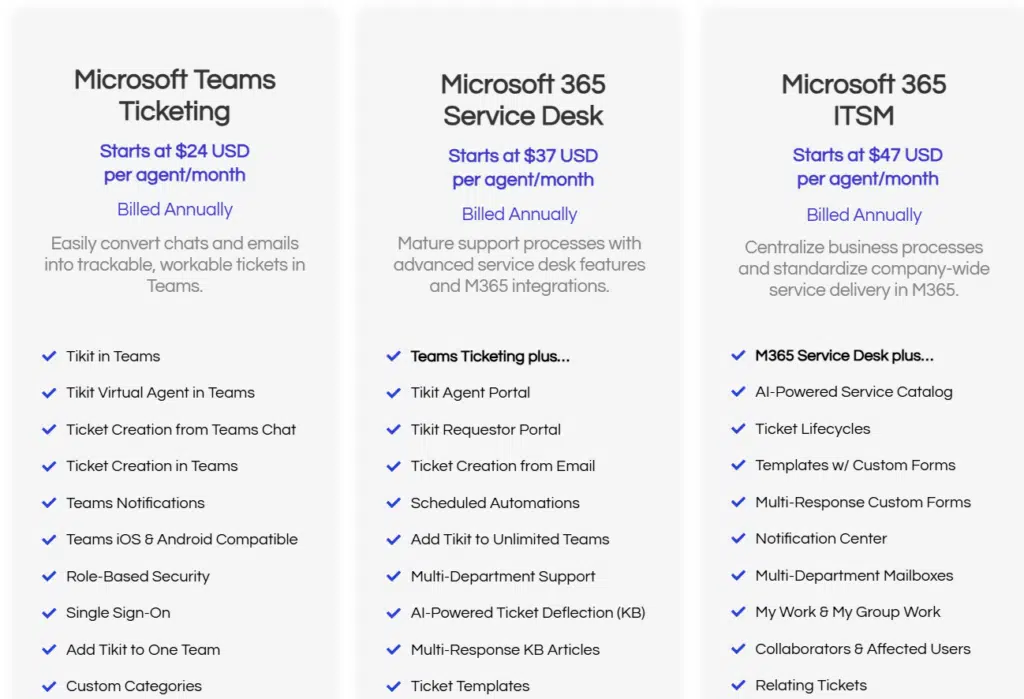
Tikit does not have a free plan but offers a 14-day free trial. Its pricing starts at nearly double the cost of Desk365:
Microsoft Teams ticketing plan: $24 per agent/month (billed annually). This includes Teams-based ticket creation, AI-powered ticket deflection, role-based security, and basic reporting.
Microsoft 365 service desk plan: $37 per agent/month (billed annually). Adds multi-department support, Power Automate workflows, and advanced IT service desk features.
Microsoft 365 ITSM plan: $47 per agent/month (billed annually). Designed for enterprise ITSM, centralized service delivery, and deeper Microsoft 365 integrations.
3.Desk365 vs Tikit: Reviews
Tikit
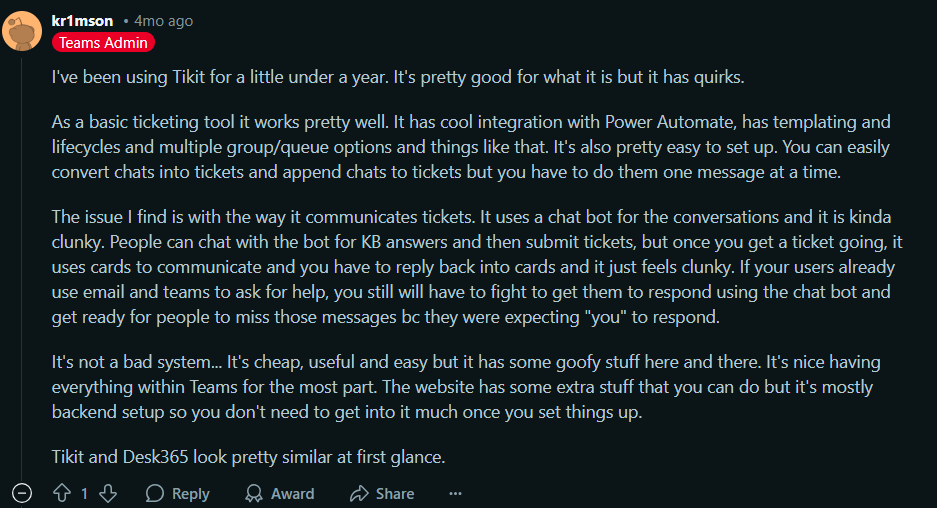
One of the users on Reddit mentioned that Tikit is a decent Teams-based ticketing tool but has its quirks. They pointed out that while it integrates well with Power Automate and has useful features like templating and lifecycle management, its chatbot-driven ticketing system feels clunky. Instead of a natural conversation flow, Tikit uses structured cards, which makes it harder for users to engage smoothly.
They also mentioned that if your team relies on email and direct messaging, switching to Tikit might be a challenge since users expect human responses, not bot-driven interactions. Another issue they highlighted was that while you can convert chats into tickets, it has to be done one message at a time, which can be frustrating for those handling multiple conversations.
That being said, they still found Tikit cheap, useful, and mostly hands-off once it’s set up.
Desk365
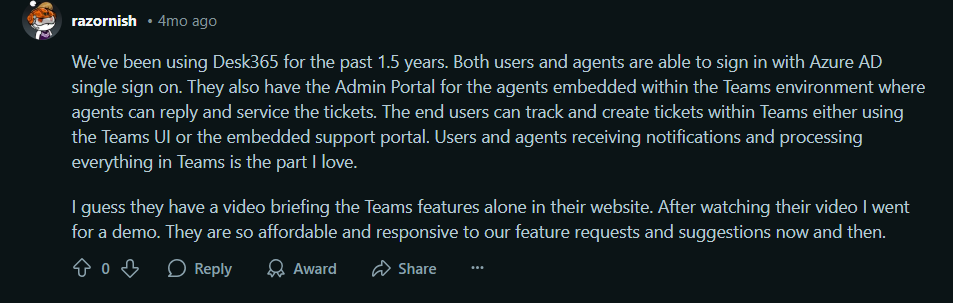
One of the Desk365 users on Reddit mentioned that they’ve been using it for 1.5 years, and it’s been a great experience. They highlighted that users and agents can sign in using Azure AD single sign-on, making access seamless. A major plus is that Desk365 has an Admin Portal embedded within Teams, allowing agents to reply to tickets and manage everything without leaving Teams.
They also loved how end users can track and create tickets directly within Teams, either through the Teams UI or the embedded support portal. The best part for them was that users and agents receive notifications and process everything inside Teams, making ticket management more efficient.
They also noted that Desk365 is affordable and highly responsive to feature requests, which was a big selling point.
Desk365 vs Tikit: Which Microsoft Teams ticketing system is best?
When choosing a Microsoft Teams-integrated ticketing system, Desk365 and Tikit both offer great features, but Desk365 stands out with its advanced customization, automation, AI-powered responses, and multi-channel support. While Tikit focuses primarily on Teams and AI-powered ticket deflection, Desk365 provides email-to-ticket conversion, SLA tracking, time tracking, approval workflows, and a knowledge base. It also offers more flexibility in ticket forms, workflow automation, and reporting.
With a 21-day free trial (no credit card required), you can experience Desk365’s seamless integration and powerful features before committing. Try it now and see how it enhances your IT and customer support.